
Live Better
Conquer campus life with top tech


(Family Features) Make each day in the classroom or lecture hall an educational success with technology that makes learning more enjoyable and managing all of life’s little details easier. From wearables that keep you connected to gadgets that encourage creativity, get educated about this season’s top technology to take to school.
Discover more options for tech-driven learning at qualcomm.com/education-laptops.

Lightweight, Powerful Computing
Designed to move with you throughout your day, the Galaxy Book Go 5G combines the best features of your smartphone with personal computer performance and productivity. You can answer emails over a latte before school, take notes during class, browse social media during lunch or video call a loved one before dinner with always on, always connected flexibility. Powered by the Snapdragon 8cx Gen 2 5G Compute Platform, the device delivers instant boot speeds that allow you to turn on and immediately use your laptop, and lightning-fast 5G connectivity speeds to complete assignments and submit work quickly from nearly anywhere.

Creative Expression
Any of today’s smartphones support more than basic call functions, but the Samsung Galaxy S22 powers creativity and self-expression all at once. Built on the Snapdragon 8 Gen 1 Mobile Platform, this smartphone also inspires a creator’s mind with a high-end camera, intelligent personal assistant and elite gaming experience. It delivers groundbreaking innovations in artificial intelligence, photography, gaming and connectivity, and is built with a bold, environmentally conscious design that makes it as aesthetically pleasing as it is high performing.

Time for a Watch that Does More
A powerful smartwatch won’t just help you make it to class on time; it’s a handy way to stay connected, keep tabs on your health and more. For example, theFossil Gen 6 Touchscreen Smartwatch runs WearOS by Google and is powered by the Snapdragon Wear 4100+ Platform, providing users faster application load times, highly responsive user experiences and more efficient power consumption. Key features include increased battery charging speed, upgraded health and wellness sensors, a swim-proof speaker and microphone, improved connectivity with Bluetooth 5 and more.

Sensational Sound
There are wireless earbuds then there are Noble Audio’s Falcon ANC equipped with Snapdragon Sound, enabling these earphones to deliver robust connectivity with high-resolution music streaming, low latency for immersive gaming and super wideband voice for crystal-clear calls. With hybrid noise canceling and multi-pairing, multipoint connection capability, these earbuds offer a high level of versatility for downtime entertainment. You can further customize your experience with the app that allows you to finetune a wide selection of settings.

Headset Hero
Designed from the ground up to drive advanced features, Snapdragon XR2 is the force behind the Meta Quest 2 headset’s freedom of movement and high-resolution display. This headset allows you to become completely immersed in the virtual reality applications and games you play for maximum adventure experiences. Even better, hundreds of hit games, one-of-a-kind experiences and a growing community await users of this next-level hardware that’s both easy to set up and safe to use.
Photo courtesy of Getty Images (students)
SOURCE:
Qualcomm

(Family Features) Keeping a watchful eye on your kids requires an increasing level of tech savvy many parents find intimidating. Not only are your kids vulnerable to bad actors online, but your family’s personal information could be at risk, as well.
Learn how to protect your children and family in this digital age with these tips:
Elementary-Age Children
- Encourage open communication. Have conversations about what your kids see and do online and talk with them about potential dangers. Avoid lecturing in favor of an open exchange of information.
- Make their inherent interest in privacy work in your favor. Kids in this age group, particularly toward the middle school years, understand the concept of privacy and value it immensely. Use that context to help them understand what goes online is there to stay. Talk about what kinds of information should always be kept private, including identifying details like addresses and social security numbers.
- Stay on alert. Not all apps are completely safe (even the ones you can access from trusted stores) and not all filters are foolproof. Keep close tabs on what your kids are downloading by reading comments and reviews, and regularly monitoring what kind of content they see.
Middle School and High School Kids
- Continue talking about privacy. You can never have too many conversations about privacy. What seems like harmless sharing on social media can be quite revealing. For example, frequent posts about visits to a favorite store or restaurant can allow a predator to begin tracking behavior patterns that make your child a target. It’s also important for kids to understand how their privacy settings work. For example, settings that allow exposure to friends of friends make their visibility to strangers much broader than they may realize.
- Help manage their online reputation. Behaviors that once resulted in a day or two of hallway chatter can now live forever. Documenting mischief online is only fun until it spills over into real life and everyone sees those mistakes in full color – including prospective future employers.
- Be clear about your position on bullying. From the safe distance of a screen, it’s easier for kids (and adults) to say things they’d never say in person. Teach your kids to handle problems constructively offline and avoid engaging in attacks on others through social media, email and other platforms.
College Students
- Reinforce the risks. Once they’re on their own, kids may feel more liberated to make their own choices online. However, college students are easy prey for identity theft and worse. Remind them what’s at stake if they fail to protect their identity and private information, like where they live and what they do on a regular basis.
- Teach smart practices. With all the independence that comes with college life, this is an ideal time for your student to take personal responsibility for his or her online security, including learning about virus protection, updating software, avoiding scams and backing up data.
If you’re looking for more practical advice for everyday family matters, visit eLivingtoday.com. Photo courtesy of Getty Images
SOURCE:
Family Features
(Feature Impact) From celebratory parties to casual get-togethers, hosting is a wonderful way to bring people together, share laughs and make memories. Of course, planning and hosting can be quite a bit of work, so a little preparation can go a long way to ensure an enjoyable time for everyone, including the host.
Follow these tips from the hosting experts at Bravo, makers of eco-friendly, high-performance paper towels, to plan your next gathering so it goes off without a hitch.
Keep the Menu Simple
Naturally, you want to make sure your guests are well-fed and happy, but trying to achieve a Michelin-star rating in your home kitchen is usually just a recipe for stressing yourself out. If you’re serving a meal, stick to some tried-and-true crowd-pleasers you can make in your sleep. Cook or bake in advance as much as possible so you’ll have less to worry about on the day itself.
Let Guests Know What to Bring
Good houseguests often enjoy contributing something, so make it easy for them – and yourself – by letting them know how they can help. You could ask one person to bring snacks, another to pick up beverages and a third to cover dessert. Potluck-style lunches or dinners are a great way to make sure everyone has enough to eat and drink while taking the pressure off just one person’s shoulders.
Have a Backup Plan
In case you’re arranging an outdoor get-together, remember the weather can betray you. Keep alternative plans on standby in case you need to move the party indoors. Tidy up your living areas and ensure there is enough seating for everyone attending. It doesn’t hurt to have indoor-friendly entertainment options available too – often, people are content to just sit and chat with one another, but depending on the crowd, classic party games can still be a hit.
 Set Up Kids’ Zones
If you’ll be welcoming children to your home, provide one or two dedicated areas where they can safely play and enjoy themselves away from the rest of the action. Having an assortment of toys, games, coloring books, chalk, bubble wands and other sources of kid-friendly fun makes it easy for the whole family to have a great time.
Make Prep and Cleanup a Breeze
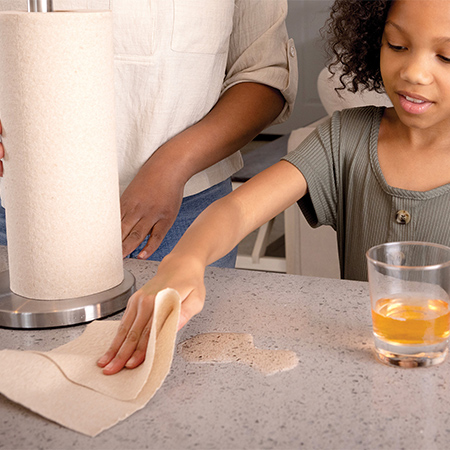
Keeping quality cleaning supplies on hand like Bravo paper towels means you can quickly wipe up spills and messes while you’re prepping. Then, after your guests depart, the strong, absorbent sheets make it easy to get your countertops sparkling again. They’re made with 75% curbside recycled paper and cardboard, making them sustainable-household-approved. Use them with water or your go-to cleaning solution before enjoying some well-deserved post-hosting relaxation in your fresh, clean home.
“Hosting can put paper towels to work, from quick countertop wipes to stuck-on foods and bigger cleanup jobs,” said chef and lifestyle expert Jamie Gwen. “Bravo has a clothlike feel that is soft on your hands, but it is still durable enough for scrubbing and strong enough to rinse and reuse.”
Find more smart cleaning tips at BravoTowel.com.

SOURCE:
Bravo
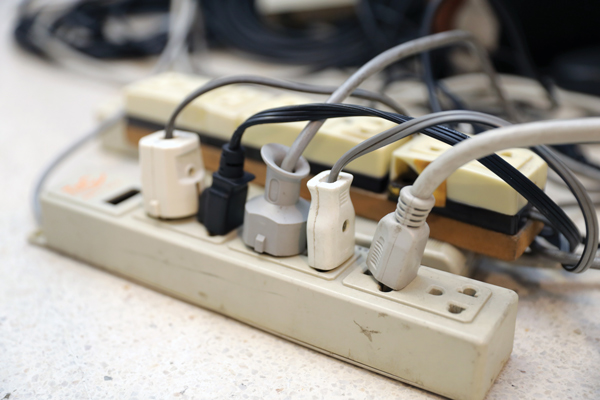
(Feature Impact) Power strips make it easy to add outlets where families need them, but they aren’t designed to handle every appliance in the home. Plugging certain high-powered appliances into a power strip can overload it, potentially causing overheating and increasing the risk of an electrical fire.
“Power strips are so common that it’s easy to assume anything with a plug can safely go into one, but that’s not the case,” said Bonnie Lee, vice president of property claims at Mercury Insurance. “Appliances that draw significant power can generate more heat than a power strip is designed to handle. A simple change in where you plug something in can help eliminate an unnecessary fire risk.”
The National Fire Protection Association (NFPA) recommends plugging portable space heaters directly into wall outlets and warns that extension cords can be too small for electrical loads such as space heaters and air conditioners. Additionally, the U.S. Consumer Product Safety Commission warns that power strips can pose a fire hazard when overloaded.
Take a closer look at these five household items, as recommended by the home safety experts at Mercury Insurance:
1. Space Heaters
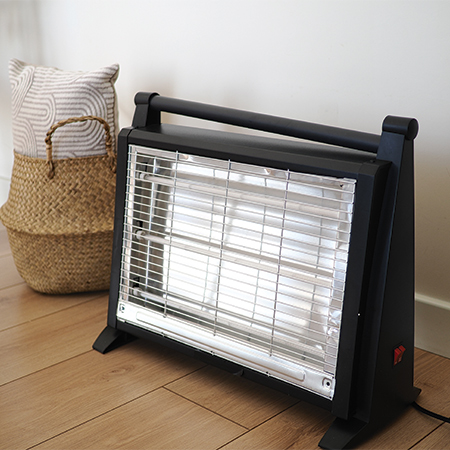
Portable electric space heaters can draw substantial power and should be plugged directly into a wall outlet rather than a power strip or extension cord. The NFPA also recommends keeping space heaters at least 3 feet away from anything that can burn and turning them off when leaving the room or going to bed.
2. Air Fryers
Air fryers pack a powerful heating element. Depending on the model, that can mean a significant electrical load while the appliance is operating. Follow the manufacturer’s instructions and, when directed, plug the appliance directly into an appropriate wall outlet rather than a power strip already serving other kitchen devices.
 3. Microwaves
Microwaves require significant power during operation and generally should have a dedicated or properly rated outlet consistent with the manufacturer’s instructions. Avoid treating an available spot on a countertop power strip as an extra kitchen outlet. If there aren’t enough outlets to safely accommodate appliances, consider having a qualified electrician evaluate the setup.
4. Refrigerators and Freezers
Refrigerators and freezers operate around the clock, and their compressors can create additional electrical demand when cycling on. These appliances should be connected according to manufacturer’s instructions and applicable electrical requirements rather than relying on a power strip as a permanent wiring solution.
5. Portable Air Conditioners
Like space heaters, portable air conditioners can place a heavy load on an electrical circuit. NFPA guidance notes extension cords may be too small for loads including air conditioners. Follow the manufacturer’s instructions and use an appropriate wall outlet rather than assuming a power strip can safely handle the appliance.
For information about in-home fire safety, visit MercuryInsurance.com/resources.
Give Your Power Strips a Home Safety Check
The appliances plugged into a power strip aren’t the only things homeowners should consider. The condition and use of the strip itself matter, too.
Homeowners should avoid plugging one power strip into another, commonly known as “daisy chaining,” and should never use a power strip as a substitute for permanent household wiring. Damaged, discolored or unusually warm power strips should be taken out of service. Also check that power strips are appropriate for their intended use and follow all manufacturer’s instructions and electrical ratings.
“If you need power strips throughout a room just to operate everyday appliances, the bigger issue may be that your home electrical system isn’t meeting your needs,” Lee said. “Adding outlets or having an electrician evaluate the circuit may take a little more effort, but it’s a much better solution than creating a potential fire hazard.”
Homeowners should also pay attention to warning signs including frequently tripped circuit breakers, outlets or plugs that feel unusually warm, flickering lights, burning odors, buzzing or crackling sounds and discoloration around outlets. A qualified electrician should evaluate electrical problems rather than relying on additional power strips or extension cords as a workaround.
Photos courtesy of Shutterstock

SOURCE:







-

 NEWS3 years ago
Suspect indicted, jailed in Tia Hutson murder
-

 NEWS4 years ago
Wreck takes the life of BHS teen, 16
-

 NEWS3 years ago
Murder unsolved – 1 year later Tia Hutson’s family angry, frustrated with no arrest
-
 NEWS4 years ago
SO investigating possible murder/suicide
-
 NEWS4 years ago
2 hurt, 1 jailed after shooting incident north of Nocona
-
 Show us something good9 years ago
Country music star children perform in Bowie
-
 100th Birthday4 years ago
Looking back at the 1958 Centennial edition of The Bowie News
-
 Show us something good9 years ago
Bowie finally earns ‘World’s Largest Bowie Knife” record from Guinness